

Description
Download Capture ScreenShot Lite – Free, Secure Screenshot Tool for Windows, Mac, Android & iOS
Capture ScreenShot Lite is a lightweight, fast, and free screenshot tool designed to simplify screen capture across all major platforms. Whether you're documenting a bug, saving a chat conversation, or preserving a game moment, this intuitive app makes capturing and sharing screenshots effortless. With support for full-screen, window, and custom region captures, it eliminates the hassle of complex built-in OS tools. No more fiddling with keyboard shortcuts or editing in image editors—just click, capture, and share. Ideal for students, professionals, and casual users alike, Capture ScreenShot Lite delivers reliable performance with zero bloat. The app is completely free, secure, and regularly updated to ensure compatibility and stability. Download now and transform your screen capture experience.
Key Features of Capture ScreenShot Lite
One of the standout reasons users love Capture ScreenShot Lite is its powerful yet simple feature set. Unlike many bloated screen capture tools, this app focuses on core functionality without compromise. First, it supports three primary capture modes: full-screen capture, window capture, and custom region selection. This flexibility ensures you can capture exactly what you need—whether it’s an entire desktop layout or a specific dialog box.
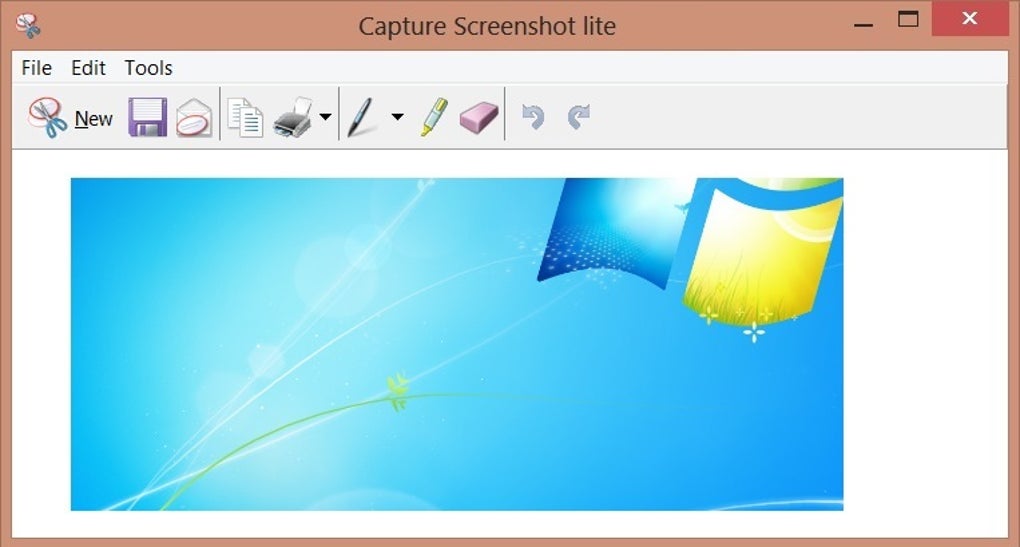
Another major advantage is the instant save and share functionality. After capturing your screen, you can automatically save the image to a designated folder, or directly share it via email, messaging apps, or social media. This eliminates the need to manually locate and attach files, saving valuable time. The app also includes a built-in image editor with basic tools like cropping, drawing, and adding text annotations—perfect for highlighting key details before sharing.
For users who frequently capture content, the app offers customizable hotkeys. You can assign your preferred shortcut keys for each capture type, making the process even faster. Additionally, the interface is clean and minimal, ensuring you’re not overwhelmed by unnecessary options. All features are accessible with just a few clicks, making it ideal for both beginners and advanced users. The app is also designed with privacy in mind—no data is sent to external servers, and all captures remain on your device unless you choose to share them.
How to Install and Use Capture ScreenShot Lite
Installing Capture ScreenShot Lite is a breeze, regardless of your operating system. For Windows users, simply visit the official website, download the installer (available as a .exe file), and run it. The setup wizard will guide you through the process in under a minute. Once installed, the app runs in the background and can be launched via the system tray icon or desktop shortcut.
On Mac, the app is available as a .dmg file. After downloading, open the disk image and drag the app into your Applications folder. You’ll need to grant accessibility permissions in System Settings (Security & Privacy) for full functionality. After that, the app is ready to use.
For Android and iOS users, the app is available on the Google Play Store and Apple App Store, respectively. Search for “Capture ScreenShot Lite,” download, and install. Note that on iOS, some features may require additional permissions due to Apple’s privacy policies, but the core screenshot functionality remains intact.
Using the app is intuitive. Launch it, and you’ll see a simple interface with three capture options: Full Screen, Window, and Region. Click your preferred mode, then either use the on-screen crosshair to select a custom area or click “Capture” to take a full-screen shot. After capturing, you can instantly edit, save, or share the image. The app remembers your last-used settings, so you don’t have to reconfigure every time.
Compatibility & System Requirements
Capture ScreenShot Lite is engineered for broad compatibility across modern devices. It supports Windows 7 and later, including Windows 10 and Windows 11. The app is optimized for both 32-bit and 64-bit systems, ensuring smooth performance without high CPU or memory usage.
For Mac users, the app is compatible with macOS 10.14 (Mojave) and later, including the latest Apple Silicon (M1/M2) Macs. The universal binary ensures native performance across Intel and Apple Silicon chips.
On mobile, the app runs on Android 6.0 (Marshmallow) and above, making it accessible to most modern smartphones and tablets. For iOS, it supports iPhone and iPad models with iOS 13 and later, including the latest iPhone 15 and iPad Pro models.
What sets this tool apart is its lightweight footprint—typically under 20MB in size. It doesn’t require administrator rights on Windows or extensive permissions on mobile, making it safe and secure for everyday use. Regular updates are released to fix bugs, improve performance, and maintain compatibility with new OS versions. You can enable auto-update notifications to stay current without missing important improvements.
Pros and Cons of Capture ScreenShot Lite
Pros
- Completely free with no hidden fees or in-app purchases
- Lightweight and fast—minimal impact on system performance
- Simple, intuitive interface—ideal for beginners and non-tech users
- Multiple capture modes—full screen, window, and custom region
- Instant sharing—direct export to email, social media, and messaging apps
- Basic in-app editor—add text, draw, crop without leaving the app
- Customizable hotkeys—speed up your workflow with personalized shortcuts
- Privacy-focused—no data is uploaded to servers; all captures stay local
Cons
- No advanced editing tools—not suitable for professional graphic design
- Mobile version lacks some features—limited to basic capture and share
- Minimal customization—few options for save location or file format
- No cloud sync—images aren’t automatically backed up
- Occasional permission prompts—especially on iOS and Mac for accessibility
Frequently Asked Questions (FAQ)
Is Capture ScreenShot Lite really free?
Yes, Capture ScreenShot Lite is completely free to download and use. There are no ads, no in-app purchases, and no premium features hidden behind a paywall. The developers believe in providing a reliable, no-cost tool for everyone.
Can I use Capture ScreenShot Lite on both Windows and Mac?
Absolutely. The app is available for both Windows and Mac operating systems. Simply download the appropriate version from the official website and install it on your device.
Does Capture ScreenShot Lite support mobile devices?
Yes, Capture ScreenShot Lite is available on both Android and iOS. You can download it from the Google Play Store or Apple App Store and use it to capture screenshots on your smartphone or tablet.
Is my captured screenshot saved securely?
Yes, all screenshots are stored locally on your device. The app does not upload your images to any external servers. Your privacy is protected, and you maintain full control over your captured content.
Can I edit my screenshots within the app?
Yes, Capture ScreenShot Lite includes a basic in-app editor. You can crop, draw lines, add text, and highlight areas directly in the app before saving or sharing your screenshot.
Conclusion: Why You Should Download Capture ScreenShot Lite Today
Capture ScreenShot Lite stands out as one of the most reliable, user-friendly, and secure screenshot tools available today. Whether you're a student taking notes, a professional documenting workflows, or a casual user saving memorable moments, this app delivers exactly what you need—fast, simple, and free. Its cross-platform support ensures you can capture screens seamlessly across Windows, Mac, Android, and iOS devices.
With no bloat, no ads, and no hidden costs, it’s a refreshingly honest tool in a crowded market. The combination of instant capture, smart sharing, and basic editing makes it perfect for everyday use. While it may not replace advanced graphic software, it excels at its core purpose: making screen capture effortless.
Don’t waste time with outdated OS shortcuts or complex software. Download Capture ScreenShot Lite now and experience the easiest way to take, edit, and share screenshots—anytime, anywhere.
Guides & Tutorials for Capture ScreenShot lite
How to install Capture ScreenShot lite
- Click the Preview / Download button above.
- Once redirected, accept the terms and click Install.
- Wait for the Capture ScreenShot lite download to finish on your device.
How to use Capture ScreenShot lite
This software is primarily used for its core features described above. Open the app after installation to explore its capabilities.
User Reviews for Capture ScreenShot lite 0
No reviews found





